Published: Updated:
How to Organize Recipes Digitally: A Simple System That Stays Organized
Recipes often end up in five places at once: browser bookmarks, phone screenshots, a notes app, paper notebooks, and forgotten photo folders.
Technically, everything has been saved. In practice, the right recipe can still be difficult to find while standing in the kitchen.
Learning how to organize recipes digitally is less about choosing the perfect app and more about giving every recipe one permanent home. The system below is deliberately simple. It works whether you have 30 recipes or a collection that has grown over the years.
First, decide what is worth keeping
Do not begin by importing every recipe you have ever liked.
A useful digital cookbook is a collection of recipes you might realistically cook. Before saving one, ask:
- Have I cooked it already?
- Do I genuinely plan to cook it?
- Is it meaningfully different from recipes I already have?
- Would I be disappointed if I could not find it again?
You can keep a small “Try later” folder for untested recipes. Everything else should earn its place.
Moving clutter from your browser into a recipe app still leaves you with clutter.
Choose one permanent home for your recipes
The best way to store recipes digitally is to keep the complete recipe in one searchable place, not just a trail of links pointing elsewhere.
A notes app can work for a small collection. Cloud folders are useful for scans and PDFs. A spreadsheet is flexible, although opening individual recipes while cooking can become awkward.
A dedicated recipe organizer becomes more useful when you want to:
- search by recipe name or ingredient;
- separate ingredients from cooking steps;
- adjust servings;
- keep personal notes;
- group recipes into folders and tags;
- turn ingredients into a shopping list.
The exact tool matters less than the rule: after choosing a permanent home, stop creating new recipe collections elsewhere.
This page focuses on cleaning up scattered recipes and creating the system. The guide to building an online recipe box goes deeper into maintaining that day-to-day collection after the initial cleanup.
Once your recipes are easy to find, use a simple weekly meal-planning system to turn a few of them into realistic dinners. If the same dish needs to feed different numbers of people, the guide to doubling a recipe without guesswork covers the kitchen decisions behind the arithmetic.
Use folders, tags, and search for different jobs
Many collections become complicated because every organizing tool is used for the same purpose. A cleaner system gives each one a separate job.
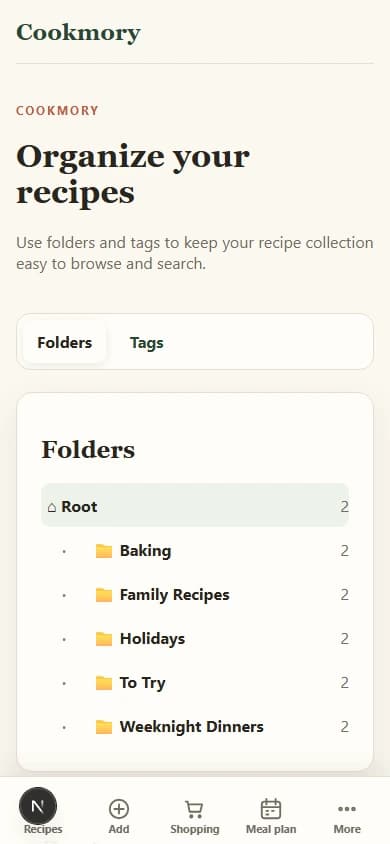
Folders are for broad groups
Folders should answer a simple question: “Where would I browse for this?”
- Weeknight dinners
- Baking
- Family recipes
- Holidays
- To try
Keep the list short. If you create a separate folder for every cuisine, ingredient, season, and cooking method, choosing a folder becomes work.
Tags are for details
Tags can overlap, so they are better for characteristics:
- vegetarian;
- under 30 minutes;
- freezer-friendly;
- chicken;
- Italian;
- kid-approved.
A lemon chicken recipe can sit in “Weeknight dinners” while also carrying several useful tags. You do not need to choose only one identity for it.
In Cookmory’s Folders & Tags workspace, the same principle keeps a growing collection easy to browse without creating dozens of nested folders.
Search is the safety net
Names should be clear enough to search. “Pasta” is not very helpful. “Creamy mushroom pasta with spinach” is.
Add the words you are likely to remember. If your family calls a dish “Grandma’s red soup,” keep that phrase in the title or notes even when the formal name is borscht.
Move recipes in small batches
A large backlog is the point where many organizing projects fail. Do not schedule an entire weekend unless you enjoy data entry.
Try a 20-minute reset:
- Pick one source, such as your screenshots.
- Save five recipes.
- Give each recipe a clear title.
- Add one folder and no more than three useful tags.
- Delete or archive the original screenshot only after checking the saved recipe.
Repeat this once or twice a week. Your collection will become useful before it becomes complete.
For screenshots and photographed pages, you can scan recipe photos into editable recipes before filing them in the same system.
Recipes from websites need a slightly different process because a bookmark may disappear or the page may change. This guide explains how to save recipes from websites without losing the useful parts.
Keep the source and your own changes
A saved recipe should answer two questions:
- Where did this recipe come from?
- What did I change?
Keep the source URL, book title, family member’s name, or photograph of the original card. Then use notes for practical changes such as:
- “Use 20% less sugar.”
- “Bake for 32 minutes in our oven.”
- “Double the sauce.”
- “The child liked this without onions.”
Those notes are often more valuable than the original instructions. They turn a copied recipe into your recipe.
A five-minute habit that prevents new clutter
Once the backlog is under control, use one small rule:
Organize a recipe when you save it, not later.
Give it a clear title, choose one folder, add a few tags, and check that the ingredients and steps are readable. This takes less than a minute for most recipes.
The result is not a perfectly catalogued database. It is something better: a collection you can actually use when you are hungry.
Once the everyday system works, you can shape selected recipes into a more deliberate online cookbook or follow a focused process for preserving and sharing family recipes.
You can start a free Cookmory collection and add a few recipes before deciding how much of your old archive is worth moving.
FAQ
What is the easiest way to organize recipes digitally?
Choose one searchable home, create a small number of broad folders, and use tags for overlapping details such as cuisine, ingredients, cooking time, or dietary needs.
Should I use folders or tags for recipes?
Use both, but for different jobs. A recipe normally belongs to one broad folder and can have several descriptive tags.
Is it better to save a recipe or bookmark the website?
A bookmark is faster, but it depends on the original page remaining available and unchanged. For recipes you cook repeatedly, save a structured personal copy and keep the original source link.
How many recipe categories should I create?
Start with five to eight broad folders. Add a new one only when several recipes clearly need it.