Published: Updated:
How to Save Recipes from Websites So You Can Find Them Later
You find a promising recipe, tap the bookmark icon, and assume the job is done.
Six months later, the recipe is buried in a folder called “Food.” The page takes twenty seconds to load, a video starts playing, and the ingredient list is somewhere below a story you have already read twice.
The real question is not only how to save recipes from websites. It is how to save them in a form that remains useful when you are ready to cook.
There are three common methods. Each one solves a different part of the problem.
Three ways to save an online recipe
1. Browser bookmarks
A bookmark is the fastest option. It preserves the source and takes one click.
It works well for:
- recipes you are only considering;
- pages you expect to read soon;
- small collections with clear bookmark folders.
Its weakness is that it saves an address, not the recipe itself. The page may be removed, placed behind a login, redesigned, or simply become difficult to find among hundreds of links.
Bookmarks are a good waiting room. They are not always a good permanent cookbook.
2. Print or save as PDF
The browser’s print function can create a local copy. This is more durable than a bookmark and can work offline.
It is useful when:
- the page has a clean print layout;
- you want to preserve the exact version you used;
- you need a file that can be archived or printed.
However, PDFs create their own problems. Ingredients and steps may be split across pages. Advertising or navigation can appear in the file. A large folder of PDFs is also difficult to browse by ingredient, cooking time, or personal rating.
3. Import a structured copy
A recipe organizer can read a URL and separate the useful information into fields such as:
- title;
- photograph;
- ingredients;
- instructions;
- preparation and cooking time;
- servings;
- source link.
This is usually the most practical method for recipes you expect to cook again. The result is easier to search, edit, scale, and use for a shopping list.
Cookmory’s recipe importer is designed for this workflow: paste the recipe URL, review the extracted information, and save it in your own collection.
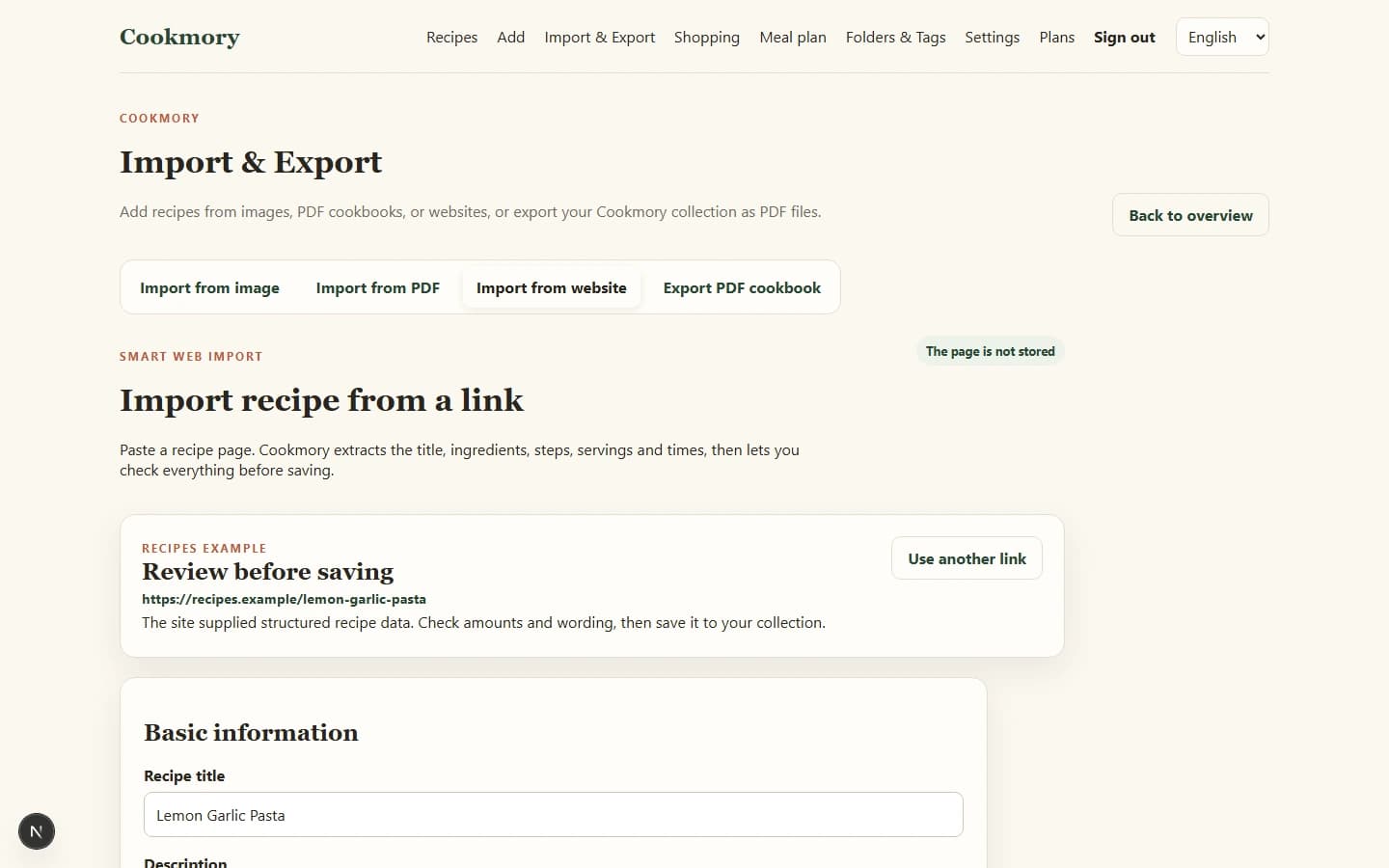
*A structured import begins with the source URL and keeps the original page connected to the saved recipe.*
Which method should you use?
| Situation | Best starting method |
|---|---|
| “This looks interesting, but I may never cook it.” | Bookmark |
| “I need an exact offline copy of this page.” | PDF or print |
| “I plan to cook and adapt this recipe.” | Structured recipe import |
| “This is a family favourite I cannot lose.” | Structured copy plus source and backup |
| “The website import missed important details.” | Manual correction, screenshot, or PDF backup |
You do not have to use only one method. A reliable system can begin with bookmarks and promote the best recipes into a structured personal cookbook.
A reliable five-step workflow
Step 1: Save the source URL
Even when you import the full recipe, keep the original link. It credits the source and lets you check later updates or comments.
Step 2: Import or copy the useful content
Save the title, ingredients, instructions, servings, and timing. Ignore page navigation, unrelated stories, advertisements, and repeated promotional text.
Step 3: Check the result before closing the page
Automated import can make mistakes, especially on unusual websites.
Check:
- fractions and units;
- ingredient quantities;
- step order;
- oven temperatures;
- headings that may have been mistaken for instructions.
This takes less time than discovering a missing quantity halfway through dinner.
Step 4: Add your own note
Write down why you saved it:
- “Try for Sunday lunch.”
- “Use less chilli for the child.”
- “Made on 12 July; sauce was too thick.”
- “Double the dressing.”
A short note makes a large collection far more personal and searchable.
Step 5: Organize it immediately
Choose one folder and a few useful tags before moving on.
A recipe for roasted chickpeas might use:
- Folder: Snacks
- Tags: vegetarian, high-protein, under 30 minutes
For a complete system, see How to Organize Recipes Digitally.
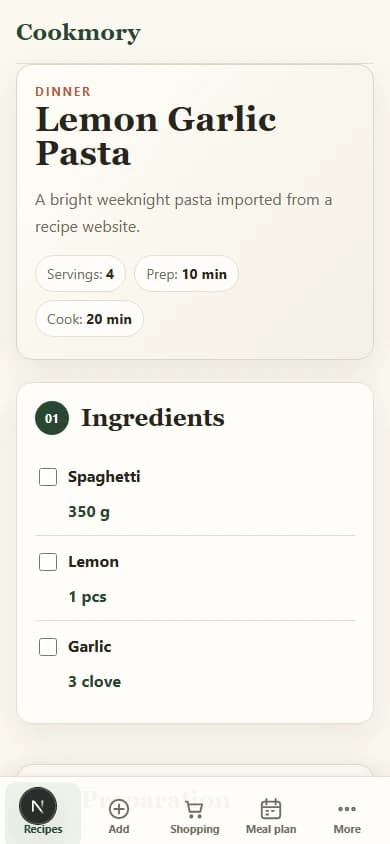
*After import, ingredients and steps are easier to read, search, and use while cooking.*
What to do when import is incomplete
Not every website exposes recipe data in the same way. Some pages have a clear recipe card; others mix instructions into paragraphs, scripts, videos, or interactive elements.
When an import is incomplete:
- Keep the source page open.
- Correct missing ingredients or steps manually.
- Save a screenshot or PDF when the original layout contains useful context.
- Add a note explaining any uncertain information.
- Avoid relying on an imported version you have not checked.
If the only copy is an image, you can turn a recipe screenshot into an editable recipe and review it before saving.
A tool should reduce repetitive work, not remove your final review.
Keep the source and respect the author
Saving a recipe for personal cooking is different from republishing someone else’s work.
Keep the original website and author information whenever possible. Do not copy a full recipe onto a public page, newsletter, or social account and present it as your own. If you share a link to your personal collection, check what information is visible and whether you have the right to distribute it.
Your private notes, substitutions, ratings, and cooking results can sit beside the source without erasing it.
That combination is useful: the original idea remains credited, while your collection records what actually worked in your kitchen.
FAQ
What is the best way to save recipes from websites?
For recipes you plan to cook repeatedly, save a structured copy in a recipe organizer and keep the original URL. Use bookmarks for temporary ideas and PDFs when you need an exact offline snapshot.
Can I save a recipe website as a PDF?
Yes. Use the browser’s Print command and select “Save as PDF.” Review the preview first because some pages include advertising, navigation, or badly split instructions.
Why do online recipe imports sometimes fail?
Websites use different layouts and data structures. Some recipe cards are machine-readable; other pages place important information in scripts, videos, images, or ordinary paragraphs.
Should I delete the original bookmark after importing a recipe?
You can remove the bookmark after confirming that the saved recipe is complete, but keep the source URL inside the recipe record.
Is it legal to save recipes from websites?
Keeping a personal copy for private use is different from republishing it. Preserve attribution and avoid publicly reproducing another author’s full text or photographs without permission. Rules vary by jurisdiction, so this is general guidance rather than legal advice.
Turn a link into a recipe you can use
Create a free Cookmory account, paste a recipe URL, check the imported ingredients and steps, and keep it with the rest of your collection.