Online Recipe Box: How to Keep Recipes You’ll Actually Find Again
A recipe box used to be a small wooden case with index cards inside. It had one major advantage: if you opened the box, the recipe was there.
We have more ways to save recipes now, but that certainty is surprisingly easy to lose. A dinner idea might live in browser bookmarks, a screenshot, a PDF, a note, a message from a relative, or a page you vaguely remember finding last winter.
An online recipe box is useful when it restores the simple part of the old system: one dependable place for the recipes you want to keep. The difference is that a digital collection can also be searched, edited, grouped, planned and used to build a shopping list.
The trick is not to collect everything. It is to make the recipes you care about easier to find and easier to use.
What an online recipe box should actually do
At minimum, a useful recipe box should answer three questions quickly:
- Do I have a recipe for this?
- Can I find it without remembering where it came from?
- Can I cook from the saved version without reopening five other things?
That sounds basic, but it rules out a surprising number of “systems.”
A folder full of screenshots stores recipes, but it is difficult to search by ingredient. Browser bookmarks preserve sources, but they do not give you a clean ingredient list. A cloud drive can hold PDFs, but it does not necessarily help when you want to see every quick chicken dinner you have saved.
A good online recipe box keeps the recipe itself in a structured form: title, ingredients, method, servings, useful times, notes and source. Once those pieces are separate, the collection becomes much easier to work with.
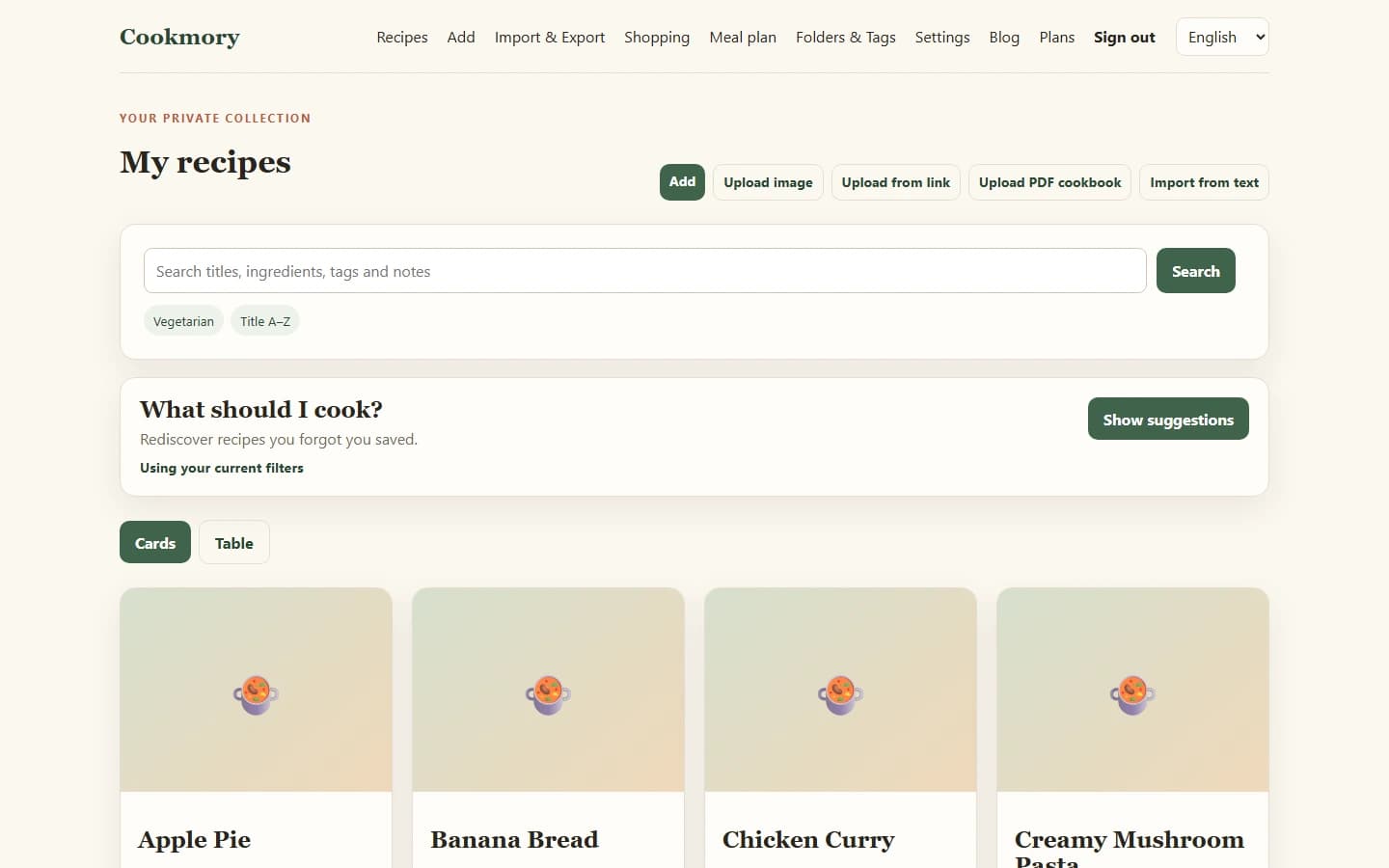
Recipe box, bookmarks or online cookbook?
These tools overlap, but they are not exactly the same job.
| Tool | Best for | Main limitation |
|---|---|---|
| Browser bookmarks | Saving something quickly to revisit later | Stores the address, not a working recipe |
| Photo/PDF folder | Preserving an exact visual copy | Harder to search and update |
| Online recipe box | Everyday storage, search, editing and cooking | Requires a little organization when you save |
| Online cookbook | A curated collection you want to preserve, share or present | Can become a project if you try to perfect everything at once |
Think of the recipe box as the working collection. It is where Tuesday’s dinner and the cake you make twice a year can live side by side.
If your goal is to create a more deliberate collection for sharing, preserving or eventually printing, see How to Create an Online Cookbook for Your Own Recipes. Your recipe box can stay practical even while your cookbook becomes more curated.
Start with recipes you would be annoyed to lose
The fastest way to ruin a new recipe system is to begin with a heroic migration project.
Do not start by importing every food-related link you have saved since 2017. Start with the recipes that already matter.
A good first batch is ten to twenty recipes that fit at least one of these descriptions:
- you have cooked them more than once;
- someone in the household asks for them;
- you have changed the original and want to remember how;
- the original source is difficult to find;
- you would genuinely be annoyed if the recipe disappeared.
That first batch teaches you what information you actually need. Perhaps you care a lot about freezer notes and very little about cuisine tags. Perhaps you always search by ingredient. Perhaps a folder called “Weeknight” is more useful than six precise categories.
Build the system around the way you cook, not around an imaginary perfect archive.
Bring each recipe in from the source you really have
A useful recipe box should not require everything to arrive in the same format.
If the recipe is on a public website, start with the URL. If it is a screenshot, scan the image. If it is inside a digital cookbook, use the PDF. If your mother sent it in a message, paste the text. If it is yours, type it once in a structured format.
Cookmory keeps those import routes together, so you can bring recipes in from websites, photos or screenshots, PDF cookbooks and text, then review the result before saving. The broader process is covered in How to Import Recipes from Websites, Photos, PDFs and More.
The review step matters. Importing saves typing; it does not remove your judgement. Check quantities, ingredient groups, temperatures and instructions before treating the recipe as your reliable copy.
Keep the source, then add the part only you know
A saved recipe becomes more valuable after you cook it.
The source tells you where it came from. Your notes tell you what happened in your kitchen.
Keep both.
Useful notes are often tiny:
- “35 minutes in our oven, not 25.”
- “Half the sugar is enough.”
- “Use the wide pan.”
- “Good for lunchboxes.”
- “Make 1.5× sauce.”
- “The child liked it without onions.”
Those details are difficult to recover from the original webpage because they never existed there. Over time, they are what turn a collection of other people’s recipes into your own working recipe box.
Use broad folders and specific tags
Organization should make a recipe faster to retrieve, not slower to save.
A simple division works well.
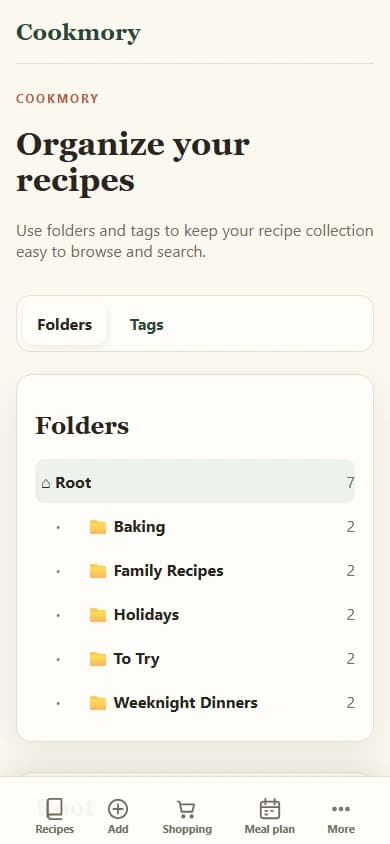
Folders are for the few broad places you naturally browse:
- Weeknight dinners
- Baking
- Family recipes
- Holidays
- To try
Tags are for details that can overlap:
- vegetarian
- chicken
- under 30 minutes
- freezer-friendly
- kid-approved
- summer
One recipe can belong to “Weeknight dinners” and still carry several useful tags. That is cleaner than trying to build a folder tree for every cuisine, ingredient, season and cooking method.
If you already have a collection that feels messy, this guide to organizing recipes digitally goes deeper into folders, tags, search and the habit of organizing a recipe when you save it.
Search should rescue you when your memory does not
The real test of an online recipe box comes on a normal evening when you remember only fragments.
You do not remember the title. You remember that it had chickpeas. Or that it was vegetarian. Or that you wrote a note about adding lemon at the end.
This is where a structured collection earns its keep. Search by the information you actually remember — title, ingredient, tag or note — instead of trying to reconstruct the original Google search that found the recipe months ago.
A recipe box that only works when you remember the exact recipe name is still making you do too much work.
Let the recipe box continue into planning and shopping
A saved recipe is most useful when you do not have to copy it again for the next task.
The natural sequence is:
saved recipe → meal plan → shopping list → cooking
Once the ingredients are structured, the recipe can help with more than storage. In Cookmory, saved recipes can be used in the weekly plan and selected meals can feed a categorized shopping list. When it is time to cook, the same recipe can be opened in Cooking Mode rather than copied into another note.
That continuity is the difference between a recipe archive and a recipe system.
For the shopping step specifically, see Recipe to Grocery List: A Practical Way to Shop From What You Plan to Cook.
Do not make the box so tidy that you stop using it
There is a point where organization becomes procrastination.
You do not need a perfect taxonomy before you save recipe number eleven. You do not need to retake every old food photograph. You do not need to write a polished headnote for Tuesday’s pasta.
For most recipes, a good saved copy needs:
- a clear title;
- readable ingredients;
- usable instructions;
- the source;
- one sensible folder;
- a few tags only when they help;
- your notes after cooking.
That is enough.
The recipe box should become more useful every time you cook, not more demanding every time you save.
Keep a way out
Any collection you build over years should have an exit route.
Look for a way to keep a backup or export a portable copy of your data. A recipe box is more trustworthy when your collection is not trapped behind one interface forever.
Cookmory provides a portable collection backup according to the current product options, and selected recipes can also be turned into a PDF cookbook under the current plan rules. If you are interested in making a polished book from part of your collection, read Recipe Book Maker: How to Turn Your Own Recipes Into a Cookbook.
Common mistakes when building an online recipe box
Saving everything “for later”
A recipe you will never cook is not more useful because it has been imported neatly. Keep a small “To try” area and be willing to delete it later.
Treating screenshots as the finished system
Screenshots are excellent source material. They are less useful as a large searchable collection. Extract the recipe you want to keep, then preserve the original image when it has value of its own.
Removing the source
Keep the original URL, book title, family member or other source whenever possible. It helps with attribution, verification and future updates.
Creating too many categories too early
If saving a recipe requires three minutes of classification, the system will eventually be abandoned. Start broad. Add structure only when a real retrieval problem appears.
Never updating recipes after cooking
The best information often appears after the first attempt. Record the practical correction while you still remember it.
FAQ
What is an online recipe box?
An online recipe box is a personal digital collection where recipes are stored in a form you can search, edit and use. Unlike browser bookmarks, it keeps the recipe information itself rather than only the page address.
What is the best way to store recipes online?
Keep the full recipe in one searchable collection, preserve the original source, and use simple organization such as folders and tags. Choose a system that can accept the sources you already have — links, photos, PDFs, text and manual recipes — so you do not create several parallel collections.
Is an online recipe box the same as an online cookbook?
They overlap. A recipe box is usually the practical working collection you use every day. An online cookbook is often more curated and may be intended for preserving, sharing or exporting a selected collection.
Can I move recipes from screenshots into an online recipe box?
Yes. A recipe scanner or image importer can turn a screenshot or photo into editable recipe fields. Always review quantities and instructions before saving the result as your working copy.
Can an online recipe box make a grocery list?
If the system stores ingredients as structured data, it can use selected recipes or planned meals to help build a shopping list. Check how the tool handles duplicate ingredients, quantities and categories before relying on it for a large shop.
Should I keep PDF copies of every recipe too?
Usually not. PDFs are useful for printing, archiving and fixed copies, but a structured collection is easier to search, edit, scale and use for planning. Export PDFs when you actually need a fixed document.
Build the box around recipes you cook, not recipes you might someday read
Start small.
Move ten recipes you already use into one searchable collection. Keep their sources. Add the notes you normally forget. Give them a few broad folders or useful tags. Then cook from that collection for a week.
If it saves you from searching through screenshots and old tabs even twice, the system is already doing its job.
You can start a recipe collection in Cookmory and bring the first recipes in from the sources you already have.