Published:
How to Import Recipes from Websites, Photos, PDFs and More
Recipes rarely arrive in a neat format.
One comes from a food blog. Another is a screenshot you took three months ago. A relative sends a photo of a printed page. Then there is the PDF cookbook on your laptop, the recipe buried in a message, and the video link you saved because you were sure you would remember it later.
The difficult part is not finding recipes. It is getting the useful ones into a form you can search, edit and actually cook from.
If you want to import recipes into one collection, the best method depends on where each recipe lives. A website URL should not be treated like a photograph, and a 200-page PDF cookbook should not be handled like a single pasted note. The goal is the same in every case: turn the source into a structured recipe, review it, keep the source, and then save it somewhere you can find again.
The short answer: match the importer to the source
A good recipe importer should give you more than one way in.
| Your recipe is currently in… | Best starting method |
|---|---|
| A public recipe website | Import the URL |
| Instagram, TikTok, YouTube, Pinterest or Facebook | Import the supported link |
| A photo or screenshot | Import the image |
| A digital cookbook | Import the PDF |
| A message, note or document | Paste the text |
| A Paprika archive | Use the dedicated Paprika import |
| Your head or a paper note you want to rewrite yourself | Add it manually |
The Cookmory recipe importer keeps these routes together, so you can choose the source you actually have instead of forcing every recipe through the same workflow.
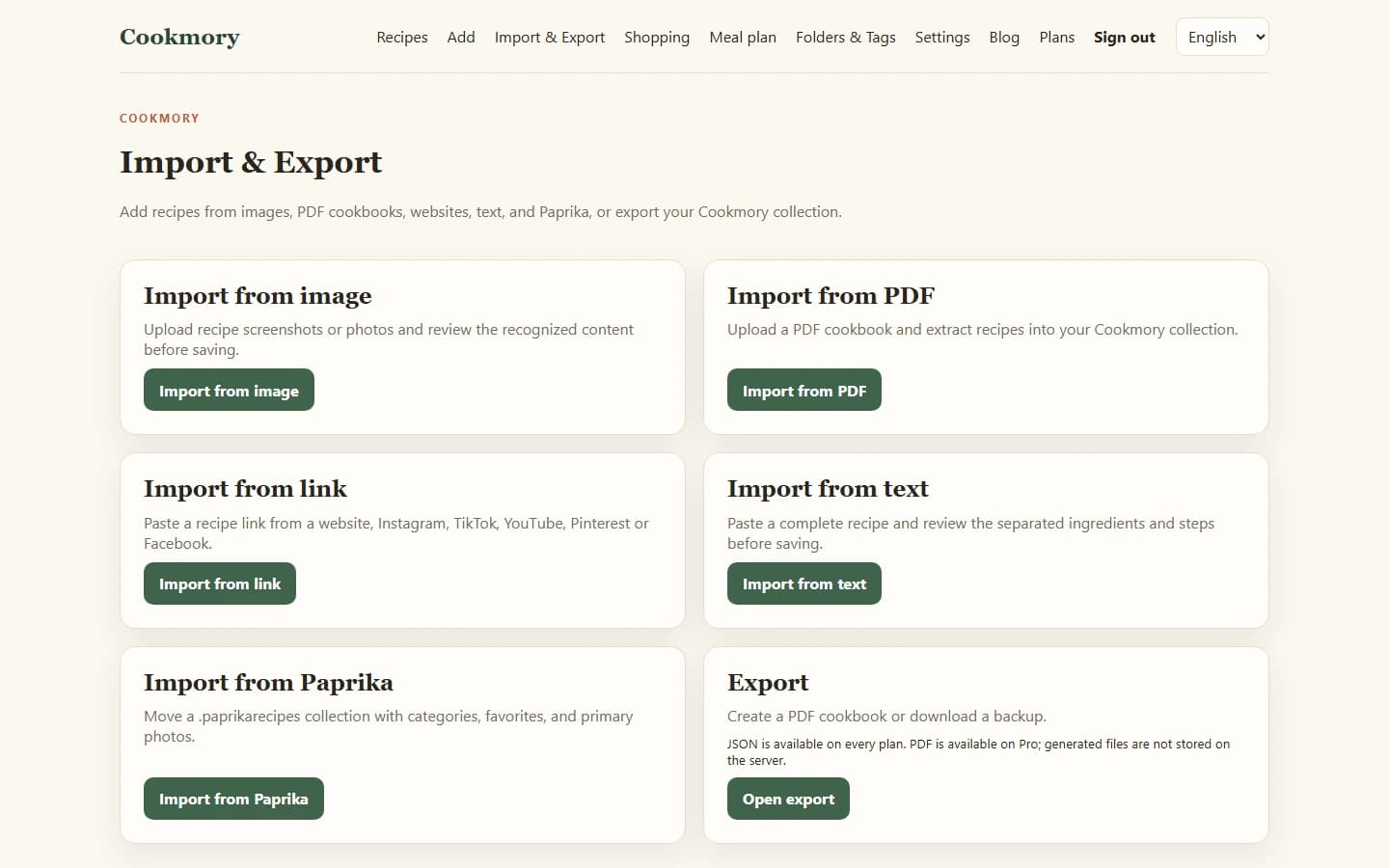
Import a recipe from a website URL
For a normal recipe page, URL import is usually the cleanest option.
Copy the page address and paste it into the importer. A structured importer can separate the information you care about — title, ingredients, instructions, servings, times and source — from the rest of the page.
That matters because saving a link and importing a recipe are not the same thing. A bookmark remembers where the recipe was. An imported recipe gives you something you can edit, search and use even after the original page has changed.
URL import works best when the page is public and contains a clear recipe. Some websites block automated access, require a login, hide part of the recipe behind an interaction, or use a layout that is difficult to read reliably. When that happens, do not keep retrying the same method forever. Use the source itself: paste the useful text or take a screenshot you are allowed to keep.
If most of your collection still lives in browser bookmarks, read How to Save Recipes from Websites So You Can Find Them Later. It covers the difference between bookmarks, PDFs and structured recipe copies in more detail.
A browser extension is useful when you save recipes often
Copying a URL is simple. Doing it twenty times a week becomes repetitive.
The Cookmory browser extension sends the active recipe page to the importer after you click it, so you can review the result without first moving through several tabs. It is most useful for people who discover recipes while browsing on a computer and want a one-click capture step without background page scanning.
Import recipes from social links
A social recipe can be surprisingly awkward to save. The useful information may be in the caption, description or surrounding post rather than in a traditional recipe card.
Cookmory's link importer accepts supported links from Instagram, TikTok, YouTube, Pinterest and Facebook alongside ordinary website URLs. Paste or share the link, then review what was found before saving it.
The review matters more here than it does on a well-structured food blog. A short video may omit quantities. A caption may say “season to taste” without explaining how much was used. A creator may demonstrate a step that never appears in the written description.
Treat the imported result as a draft. Check it against the source while the post is still open.
Import a recipe from a photo or screenshot
Photos solve one problem immediately: they preserve what you saw.
They create another problem later. A camera roll full of recipes is difficult to search by ingredient, dish, cooking time or your own notes.
Image import turns the visible text into an editable recipe draft. This is useful for:
- cookbook pages;
- magazine clippings;
- printed recipe cards;
- screenshots;
- photographed printouts.
The quality of the result depends on the image. Even light, a straight camera angle and a complete page make recognition easier. Small fractions, temperatures and units deserve special attention during review.
Cookmory is designed around that review step rather than pretending recognition is infallible. If you want a deeper guide to photographing and checking printed recipes, see Recipe Scanner: How to Scan Recipes Without Retyping Them.
Import recipes from a PDF cookbook
PDFs need their own workflow because one file may contain dozens or hundreds of recipes.
If you simply keep the cookbook as a PDF, you can search text when the file allows it, but each recipe still remains trapped inside the book's page layout. Importing changes the job: instead of opening a 240-page file every time you want the lentil soup, you can save the recipes you actually use as individual entries.
A PDF may contain selectable text, scanned page images, or a mixture of both. Decorative layouts, multiple columns and poor scans can make extraction harder, so review is essential.
Cookmory's PDF importer is intended for cookbook-style files and lets you inspect the extracted recipes before they become part of your collection. For a detailed workflow, including what to check in scanned and multi-column PDFs, read How to Import Recipes from a PDF Cookbook.
Import a recipe from text
Text import is the quiet workhorse.
It is useful when the recipe is already sitting in:
- an email;
- a chat message;
- a notes app;
- a document;
- a copied block of text from a page that cannot be imported by URL.
Paste the complete recipe if possible. Include the title, ingredients and instructions rather than only the interesting paragraph in the middle. The more complete the source, the less reconstruction you have to do afterwards.
Text import is also a good fallback. If a URL importer cannot access a page but you can legally view and copy the recipe for your personal use, paste the relevant text and keep the original source link in the recipe record.
Moving an existing collection is different from importing one recipe
If you already have hundreds of recipes in another recipe manager, do not move them one by one unless you have to.
Look for an export format first. Cookmory includes a dedicated Paprika archive import because a collection export contains useful structure that would be lost if every recipe were treated as a random webpage.
The same principle applies to any migration: preserve categories, favorites, source information and images when the source format makes that possible. A migration should reduce cleanup, not create a second migration project inside your new cookbook.
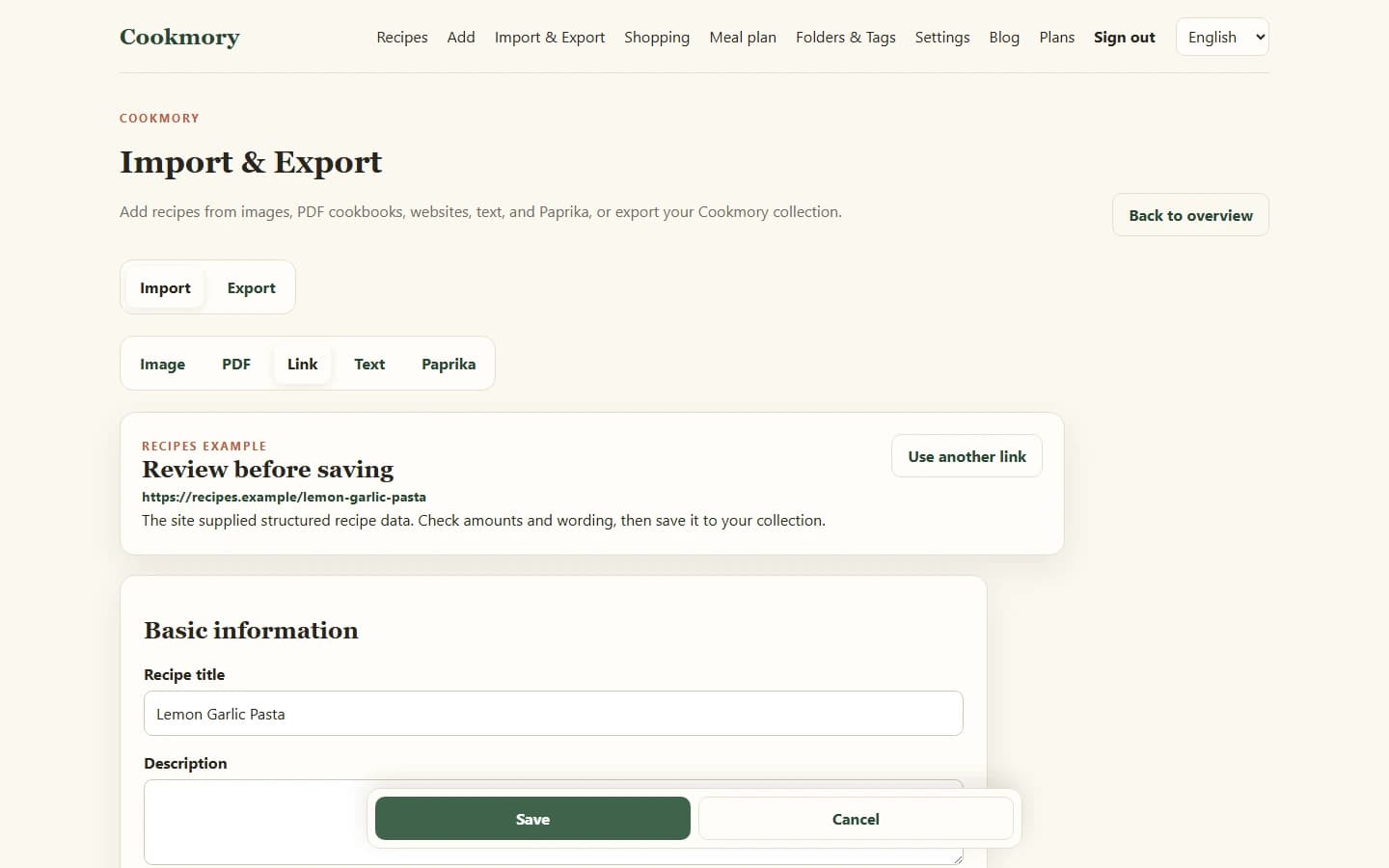
Review the recipe before you save it
Automation saves typing. It does not remove the need to look at the result.
The fastest useful review is also the most boring one:
- Check the recipe title.
- Scan every quantity and fraction.
- Make sure units stayed attached to the right ingredients.
- Confirm oven temperatures and cooking times.
- Check the order of the steps.
- Keep ingredient groups such as “sauce” or “filling” when they matter.
- Preserve the original source.
Pay disproportionate attention to tiny characters. `1/2`, `1 1/2`, `180°C` and `18 minutes` are easy to misread and annoying to discover halfway through cooking.
Do not import everything just because you can
A faster importer can create a bigger mess faster.
Before moving a large backlog, choose ten recipes you genuinely use. Import them, cook from the saved versions and notice what information you keep looking for. Maybe tags matter to you. Maybe they do not. Maybe you want folders for weeknight dinners and baking, but you never search by cuisine.
Once the system works for ten recipes, scale it.
The broader guide How to Organize Recipes Digitally explains a simple folder-and-tag structure that can grow without becoming another filing project.
Keep the source, then add your own knowledge
An imported recipe should not erase where it came from.
Keep the source URL, book title, original photograph or other attribution. Then add the information only you know:
- “Use less salt next time.”
- “Works better in a 20 cm tin.”
- “Double the dressing for four people.”
- “The children liked this without chilli.”
Those notes are what turn a collected recipe into a personal cookbook.
What happens after the import matters just as much
A recipe importer is useful because of what comes next.
Once the recipe is structured, you can give it a useful title, search it later, add folders and tags, adjust it, plan it for the week, put its ingredients onto a shopping list, or open it in a cooking-focused view.
That is the difference between collecting recipe files and building an online cookbook you can keep using.
FAQ
What is the easiest way to import recipes?
Use the source format directly. Import a website by URL, a screenshot or printed page as an image, a cookbook as a PDF, and a message or note as text. Review the extracted recipe before saving it.
Can I import a recipe from any website?
Many public recipe pages can be imported, especially when they expose clear recipe information. Some sites block automated access, require authentication or use unusual layouts. In those cases, text or image import may be a better fallback.
Can I import recipes from Instagram, TikTok or YouTube?
Cookmory's link importer supports links from selected social platforms, including Instagram, TikTok and YouTube. The completeness of the result depends on what information the original post makes available, so check it before saving.
Can I import recipes from screenshots?
Yes. A clear screenshot can be recognized and turned into editable recipe fields. Check fractions, units, temperatures and step order before saving.
Can I import an entire PDF cookbook?
Cookmory includes a PDF cookbook importer intended to extract recipes from cookbook-style PDFs. Results depend on the file's text quality and layout, so review the detected recipes before saving them.
Should I keep the original source after importing?
Yes. Keep the source URL, book title, image or other attribution whenever possible. It helps you verify the recipe later and keeps the original creator connected to the copy you use privately.
Start with one recipe you already want to keep
Do not migrate your entire cooking life tonight.
Open Cookmory Import & Export, choose the source you already have, and import one recipe you know you will cook again. Check it carefully, save it, and see whether having a clean, searchable copy is more useful than another bookmark or screenshot.