Published: Updated:
How to Import Recipes from a PDF Cookbook Without Retyping
A PDF cookbook can be beautifully organized and still be inconvenient at dinnertime.
You remember the recipe you want, but not the page. Search finds the ingredient in the index, the introduction and four other dishes. On a phone, the ingredient list is on one page and the method begins on the next. If the PDF is a scan, search may not work at all.
Importing recipes from a PDF changes the format of the problem. Instead of treating the cookbook as one large file, you extract the recipes you want as individual entries with ingredients, steps, notes and source information.
That can save a great deal of typing, especially with a cookbook that already contains dozens of recipes. It still requires review. PDFs are designed to preserve page layout, not to explain to software where one recipe ends and the next begins.
First, identify what kind of PDF you have
Not every PDF contains text in the same way.
Text-based PDF
You can select words with the cursor and copy them. These files usually produce the cleanest extraction because the recipe text is already present inside the document.
Scanned PDF
Each page is essentially a photograph. The visible words must be recognized from the image before the recipe can be structured. Clear, straight scans help; faint pages, shadows and decorative backgrounds create more work.
Mixed PDF
Some pages contain real text while others are images. This is common in older books that have been assembled from several sources or scanned and edited over time.
Complex-layout PDF
Multiple columns, sidebars, floating captions, ingredient boxes and decorative headings can confuse the reading order even when every word is technically selectable.
You do not need to diagnose the file perfectly. The point is to know why one cookbook imports cleanly while another needs more correction.
PDF import is different from copying and pasting
You can always open a PDF, copy one recipe and paste the text somewhere else.
That works for a single dish. It becomes tedious when you want thirty.
A PDF recipe importer is useful because it can help identify recipe-shaped sections in the file, separate the content, and give you drafts to review rather than one enormous wall of copied text.
Cookmory includes PDF cookbook import in Import & Export. The file is handled according to Cookmory's current privacy model, and the extracted recipes are reviewed before you save them to your collection.
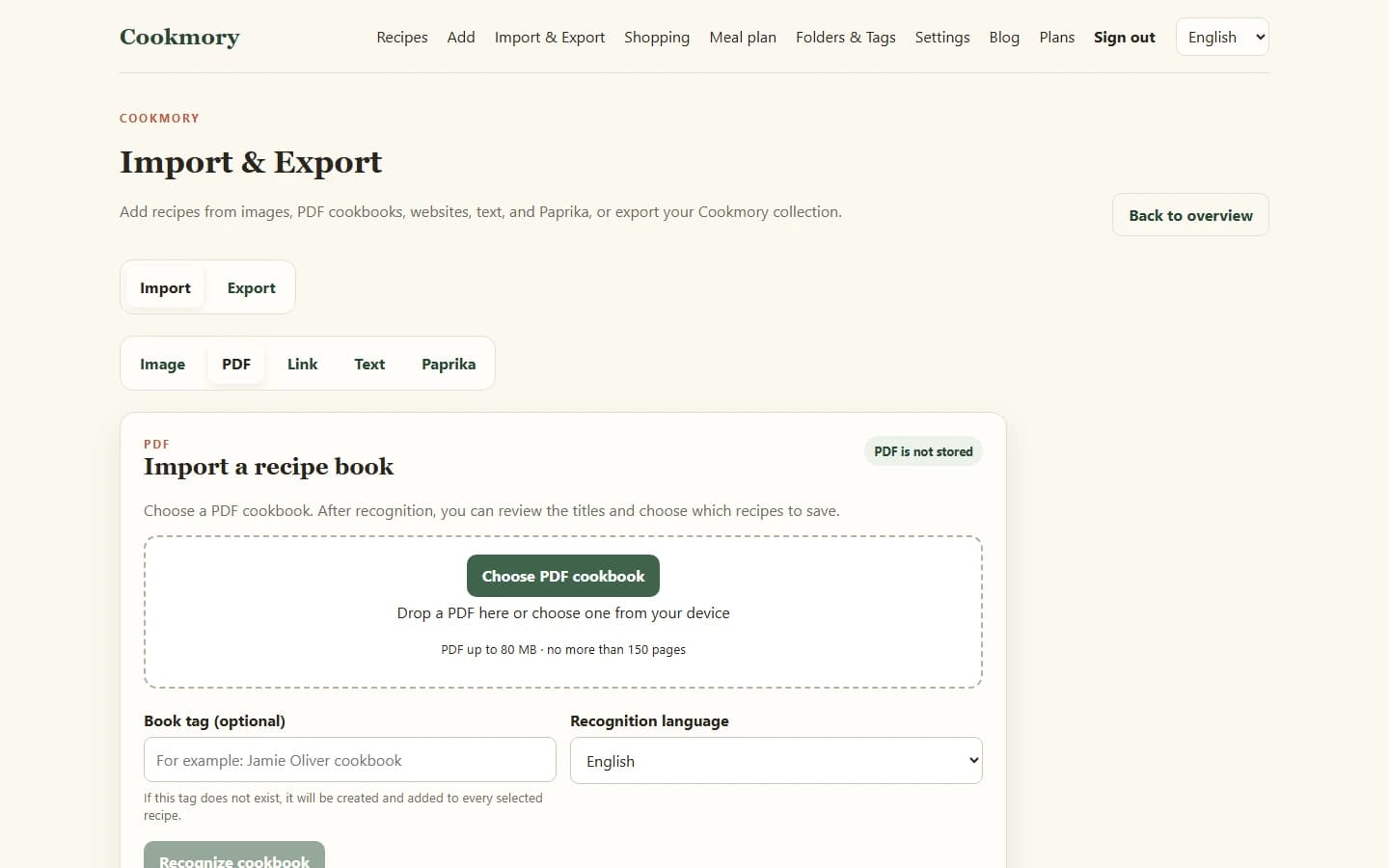
How to import recipes from a PDF in Cookmory
The exact interface may evolve, but the useful workflow is straightforward.
1. Open the PDF importer
Go to Import & Export and choose PDF import.
Use the original cookbook file when possible rather than a screenshot of every page. A PDF preserves page order and may already contain a readable text layer.
2. Let the importer read the cookbook
The importer analyses the document and looks for recipe content. A clean digital cookbook may be quick to interpret; a scanned or highly designed book may take more work.
Do not treat processing time as a quality score. A fast result can still contain a wrong fraction.
3. Review the detected recipes
Check whether titles, ingredients and steps have been separated correctly. In a large cookbook, also check recipe boundaries: the last line of one recipe should not become the first instruction of the next.
4. Select the recipes worth keeping
You probably do not need every recipe in the book.
Import the dishes you use, want to try, or would struggle to find again. Leaving the rest in the original PDF keeps your personal collection more useful.
5. Save and organize them
After review, save the recipes you want and add only the folders, tags or notes that will actually help later.
If you are moving recipes from several different sources, the broader guide How to Import Recipes from Websites, Photos, PDFs and More explains how PDF import fits alongside URL, image and text import.
What to check before saving an extracted PDF recipe
PDF extraction errors tend to be small enough to look believable.
That is why they are worth checking.
Fractions and quantities
Look carefully at `1/4`, `1/2`, `1 1/2`, decimal points and commas. A missing `1` in `1 1/2 cups` produces a perfectly readable but very different recipe.
Units
Make sure `tsp`, `tbsp`, `g`, `kg`, `ml`, `oz` and similar abbreviations stay attached to the right quantities.
Ingredient groups
Recipes often separate components such as dough, filling, sauce and topping. Preserve those groups when they help the cooking process.
Reading order
Two-column pages can be deceptive. The extracted text may jump from the bottom of the left column to the wrong place on the right.
Temperatures and timings
Check the numbers that can ruin dinner quietly: `180°C`, `350°F`, `15 minutes`, `1 hour`.
Recipe boundaries
In a cookbook, a decorative note below one recipe may actually belong to the next page. Make sure the importer has not merged two dishes or split one recipe in the middle.
Scanned cookbooks need more patience
A scanned PDF is not a bad source. It is simply less predictable.
Recognition works best when:
- pages are straight;
- text is sharp;
- contrast is good;
- the scan includes the entire ingredient list and method;
- there are no fingers, shadows or strong reflections over the text.
If the source is an old family cookbook, keep the original PDF even after importing the recipes. The scan contains typography, handwritten marks and page context that a cleaned-up recipe entry cannot preserve.
For individual photographed pages and recipe cards, the recipe scanner guide explains how to get cleaner source images before recognition.
Do not let the importer erase the book
A PDF cookbook is still a source.
When you save an extracted recipe, record enough information to find the original again. That may be the cookbook title, author, edition and page number, or the original file name plus a note.
This is useful for three reasons:
- You can verify a doubtful instruction later.
- You preserve attribution.
- You keep access to photographs, introductions and context that were never meant to become part of the structured recipe.
For a commercial cookbook, importing for your private cooking is not the same as republishing the author's recipes. Do not turn a personal extraction workflow into a public copy of someone else's book.
Avoid the “import all 400 recipes” trap
A large PDF makes bulk import tempting.
Ask a harder question first: will you use the result?
A personal collection of 80 recipes you can find, rate and improve is often more useful than 800 untouched imports. Start with one chapter or a group of recipes you already cook. Use them for a week. Then decide whether the rest of the book deserves the same treatment.
This is the same principle behind organizing recipes digitally: the purpose of the collection is not to prove that nothing was left behind. It is to make the recipes you care about easier to use.
PDF to recipe and recipe to PDF are opposite jobs
The phrases sound almost identical, but the workflows are reversed.
Import recipes from PDF: you already have a cookbook PDF and want the recipes inside it to become structured, editable entries.
Recipe to PDF: you already have a recipe and want to turn it into a clean file for printing, saving or sharing.
If the second job is what you need, see Recipe to PDF: How to Turn a Recipe Into a Clean, Printable PDF.
What should you do with the recipes after import?
The useful part begins after extraction.
Once each recipe is its own entry, you can search by title or ingredient, add personal notes, adjust servings, group recipes, plan meals, create shopping lists, and use a cooking view instead of zooming around a PDF page.
If the long-term goal is to build a collection rather than simply break apart one file, How to Create an Online Cookbook for Your Own Recipes explains how to structure that collection so it stays manageable.
FAQ
Can I import recipes from a PDF cookbook?
Yes. A PDF recipe importer can extract recipe content from a cookbook and turn it into individual drafts for review. The result depends on the PDF's text quality, scan quality and page layout.
Can a PDF importer read scanned cookbook pages?
Image-based PDFs can be processed using text recognition, but they generally need more review than PDFs with a clean text layer. Clear, straight, high-contrast scans produce better results.
Can I import multiple recipes from one PDF?
Cookmory's PDF cookbook workflow is designed for cookbook-style files rather than requiring every recipe to be a separate PDF. Review the detected recipe boundaries and save the recipes you actually want in your collection.
Why are ingredients sometimes imported in the wrong order?
Multi-column layouts, sidebars and decorative page designs can change the order in which text is extracted. Compare the imported draft with the original page before saving it.
Should I delete the PDF after importing the recipes?
Usually not. Keep the source file when it matters, especially for family material or purchased cookbooks. It provides attribution and lets you check anything that may have been interpreted incorrectly.
Is importing a PDF the same as converting a recipe to PDF?
No. PDF import turns recipes inside a PDF into structured recipe entries. Recipe-to-PDF export does the reverse: it turns a recipe into a printable or storable PDF file.
Try it with a cookbook you already own
Choose a PDF cookbook you actually use, open Cookmory PDF import, and start with a small group of recipes rather than the whole archive.
The first goal is not to empty the PDF. It is to make one recipe easier to find and cook next time.